- Home
- Library
- Books & More
- Makerspace
Makerspace
Equipment Available:
Adobe Computer Workstation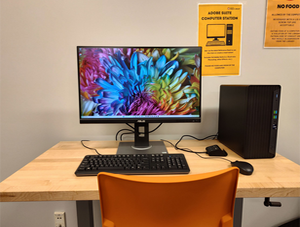
(Troubleshooting assistance with Adobe software is not provided by staff.)
- This computer contains the full Adobe Creative Cloud, which includes: Photoshop, Illustrator, After Effects, Adobe Premiere Pro, Acrobat, InDesign, Dreamweaver, and more!
- Patrons Must bring their own digital storage devices to save their files (i.e., flash drives, SD cards, etc.)
- Walk-ins are available, though reservations are given priority (For walk-ins, please see a librarian at the Adult Reference Desk).
- To make a reservation, click here!
Brother SE1900 Embroidery Machine
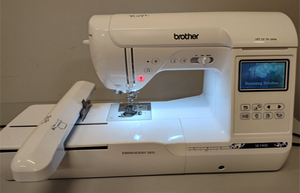
(Troubleshooting assistance with Adobe software not provided by staff.)
- Patrons Must bring their own materials and thread.
- Reservation Required. To make a reservation, click here!
- Compatible with a USB flash drive.
- Guidebooks and Quick Start guides available. For troubleshooting, please see this Quick Start Guide (PDF)
Button Makers (1.25" and 2.25")
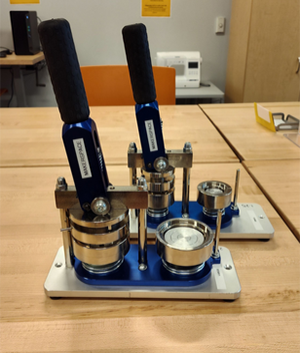
- Two button makers are available (one is 1.25" and the other is 2.25").
- Reservations Required. To make a reservation, click here!
- Maximum of 100 buttons can be made per reservation.
- Cost: 5 cents per button.
- We provide all of the button supplies (mylar, cutting devices, button backs, button fronts, etc.), but you Must supply your own artwork.
- To properly size your artwork, use the templates available on this website!
See the video at the bottom of this page for a quick guide on how to use the button makers! :)
Laminators (Large and Small)
Large Laminator
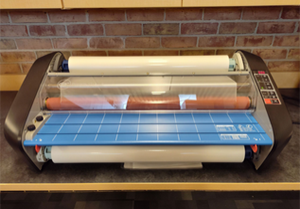
- Cost: 50 cents per linear foot of lamination sheet used.
- Best for large lamination jobs such as posters (lamination width up to 27.5").
- Walk-in appointments are available, though reservations are given priority (For walk-ins, please see a librarian at the Adult Reference Desk).
- To make a reservation, click here!
Small Laminator
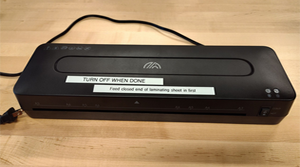
- Patrons Must bring their own laminating sheets (or they can be purchased at the Access Services Desk).
- Cost for one 8x11 sheet is 25 cents. The cost for one 11x17 sheet is 50 cents.
- Best for small lamination jobs.
- Walk-in appointments are available, though reservations are given priority (For walk-ins, please see a librarian at the Adult Reference Desk).
- To make a reservation, click here!
Cricut Joy Xtra
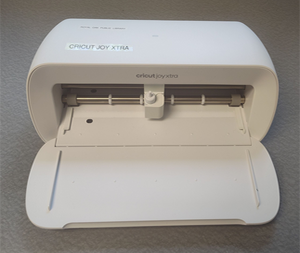
The Cricut Joy Xtra can be used to create a variety of custom projects, including vinyl decals, stickers, cards, personalized apparel, labels, and so much more!
Works with vinyl, iron-on (HTV), paper, and cardstock, writable labels, printable sticker paper, and more!
- Patrons Must bring their own Cricut Joy Xtra compatible materials (i.e., infusible ink, smart vinyl, permanent vinyl, compatible blanks (cups, t-shirts, etc.).
- For a list of Cricut Joy Xtra compatible materials and to learn more about the Cricut Joy Xtra, click here!
- Patrons will have access to a standard grip mat and the Basic Cricut Tools (i.e., scissors, weeding tool, scraper, etc.)
- Reservation Required. To make a reservation, click here!
- Important Note: The Cricut Joy Xtra requires access to a device that can connect to it via Bluetooth (i.e., a smartphone, laptop, etc.) You will need to download Cricut Design Space on your phone, laptop, tablet, etc. to create your designs.
Cricut Mug Press
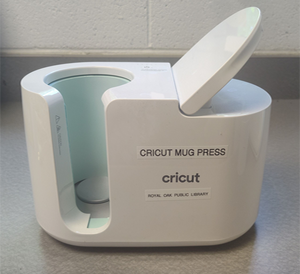
The Cricut Mug Press can be used to create your own custom mugs using Cricut infusible ink markers or Cricut infusible ink!
(Cricut Mug Infusible Ink example)
- Patrons Must bring their own Cricut Mug Press compatible materials (i.e., Cricut mug blanks, Cricut Joy Infusible ink, etc.)
- Reservations Required. To make a reservation, click here!
For specific questions, please contact the Makerspace librarian at (248) 246-3724.
Important Note: Patrons using any device in the Makerspace assume all responsibility for any damage to the device(s) and/or their project materials.
Note: The Royal Oak Public Library's Makerspace is supported in part by the National Endowment for the Arts. To find out more about how National Endowment for the Arts grants impact individuals and communities, visit www.arts.gov.
Digital Imaging and Audio Lab (DIAL)
Did you know the DIAL is a part of the Makerspace?
The DIAL is a collection of equipment that patrons can use to digitize old formats (VHS, audio cassettes, Super 8 film, slides, negatives, etc.) into newer formats so that you can preserve your treasured memories!
- Reservations are required to use all DIAL equipment. To make a reservation, click here!
- To learn more about the DIAL, what equipment is available, and the types of conversion offered, click here!